






The PC version of Phantom Blade Zero needs to be installed on an SSD. Before the first download, reserve at least 160 GB of free space on the target drive; players who pre-loaded the game complete the roughly 5 GB day-one update first, then launch the game.
Before Installing: Confirm the SSD and Free Space
The launch settings Q&A lists the game package at about 150 GB, and download preparation calls for at least 160 GB of free space on the target drive. Downloading, unpacking, verification, and updates all use disk space, and for later updates you reserve extra room as Steam prompts at the time.
Press Ctrl+Shift+Esc to open Task Manager and check the installation drive's disk type under "Performance". The Steam store's Minimum and Recommended configurations both require an SSD, and they also list a 64-bit Windows 10/11 system, 16 GB of RAM, and DirectX 12.
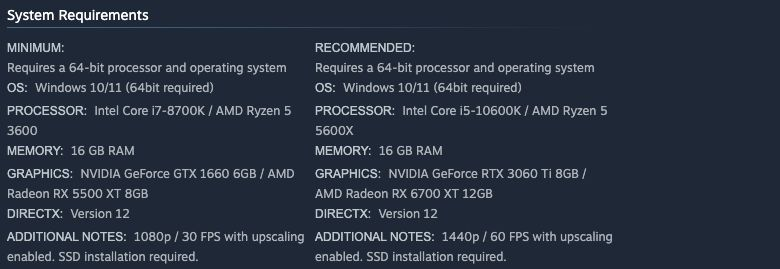
Phantom Blade Zero system requirements on the Steam store: both the Minimum and Recommended configurations require installation on an SSD
What Pre-Load Players and Direct-Download Players Each Need to Do
| Current status | What to do before launching |
|---|---|
| Pre-load completed | Complete the verification after unlock, then download and install the roughly 5 GB day-one update |
| Direct download after release | The downloaded content already includes the day-one update; wait for the client to finish installing |
| Client reports insufficient space | Clean up the target drive or change the installation path, then continue once the current space prompt is satisfied |
The day-one update includes performance improvements for ray tracing and path tracing, along with multiple bug fixes. During patch installation, files are temporarily saved, verified, and replaced, so the disk space needed can exceed the download size.
First Launch: Waiting for Shader Compilation
Shader compilation runs the first time you enter the game. Keep the game in the foreground, wait for compilation to finish, and then continue into gameplay. Running in the background lowers the CPU priority during compilation and may extend the wait.
Once you are in the game, you can continue with the PC Configuration and Graphics Settings Guide and apply the recommended graphics settings through the corresponding menus.
When Download Progress Stalls, First Check What the Client Is Doing
Steam may be unpacking, verifying, or installing files, and the processing speed of these stages depends on disk performance. First check the processing status shown in the client, then check your network connection and the free space on the target drive, and pause other download tasks that are using bandwidth.
Launch Errors or Crashes: Check the Files, Then Report the Specific Problem
- Complete the updates Steam prompts, then restart your PC and the client.
- In the Steam "Library", right-click Phantom Blade Zero and go to "Properties" → "Installed Files".
- Click "Verify integrity of game files", wait for the check to finish, and then launch the game.
- When the client reports missing runtime components, install or repair the corresponding components as prompted.
If errors persist, submit a report through the official website's customer support with the operation steps where the problem occurred, screenshots of the error, your system and hardware configuration, graphics driver, and game version, to help pinpoint the issue.
References
- Steam Store System Requirements
- S-GAME Launch Announcement: Reason and Madness
- Launch Settings Q&A (published on 3DM)
- Launch Settings Q&A (published on Gamersky)
More Phantom Blade Zero guides
Frequently asked questions
How much free space do I need on the target drive?
Reserve at least 160 GB of free space before the first download. The launch settings Q&A lists the game package at about 150 GB, and downloading, unpacking, verification, and updates all use disk space.
I pre-loaded the game — what do I do before launching?
Complete the verification after unlock, then download and install the roughly 5 GB day-one update before starting the game. If you download directly after release, the downloaded content already includes the day-one update; wait for the client to finish installing.
What does the day-one update contain?
Performance improvements for ray tracing and path tracing, plus multiple bug fixes. During patch installation, files are temporarily saved, verified, and replaced, so the disk space needed can exceed the download size.
Why does the first launch take extra time?
Shader compilation runs the first time you enter the game. Keep the game in the foreground until it finishes; running in the background lowers the CPU priority during compilation and may extend the wait.